
Lotus Shuffler Troubleshooting: Jams, Misfeeds, and a Machine That Won't Start
Most card shuffler problems come down to three causes, and most of the fixes take under a minute. Jams and double feeds almost always trace to the deck, not the machine: a ragged stack, warped cards, or a load past the two-deck, 104–112 card capacity. Cards that will not feed at all are usually cards the feed was never rated for: sleeved, oversized, or very glossy. And a machine that seems dead is usually a touch problem: the Lotus has no buttons, so pressing harder does nothing. It wants a fingertip resting on the sensor. After that, a fresh 9V battery revives more dead-looking shufflers than any other fix. Here is each symptom, its cause, and the fix.
Quick diagnosis
| Symptom | Likely cause | Fix |
|---|---|---|
| Cards jam mid-pass | Ragged, unsquared stack | Tap the deck flush and reload |
| Two cards feed at once | Warped or humidity-bowed deck | Flatten under a heavy book overnight, or retire the deck |
| Jams only on big loads | Load past the two-deck capacity | Keep loads at 104–112 cards; split bigger stacks |
| Rollers spin, cards stay put | Glossy finish, or coating residue on the rollers | Wipe the rollers; slick decks may never grip |
| Nothing happens at all | Pressing the sensor instead of touching it | Rest a fingertip on the sensor; it reads the deck count itself |
| Still nothing | 9V battery dead or unseated | Reseat or replace the battery |
| Card stuck under a roller | Any jam | Remove the deck first, then free the card, never yank |
Cards jam or two feed at once
Feed problems start with the deck. Four causes cover nearly every jam.
- A ragged stack. A stack loaded at an angle or with cards sticking out invites a misfeed on the first pass. Square the deck before loading: tap it flush on the table, then set it in. This one habit prevents more jams than everything else on this page combined.
- A warped deck. Cards that have bowed from humidity or heavy play do not sit flat, so the rollers catch them unevenly and feed two at once or none at all. Flatten a warped deck under a heavy book overnight. If it still will not sit flat, retire it. A bowed deck misfeeds in every machine, not just this one.
- Overloading. The Lotus is rated for two standard poker-size decks loaded together: 104 bare cards, with 108-card canasta and 112-card modern UNO decks inside capacity. Do not force more. A 162-card Skip-Bo deck, for example, goes through in two loads. If jams only show up when the hopper is stuffed, the load is the problem. More on big family decks in the UNO shuffler guide.
- Slick finishes. Smooth or glossy card stock can slip on the rollers instead of gripping. Texture decides whether a deck feeds, not the brand on the box. A deck that slips will either hesitate or send two cards through together.
One rule matters more than all of these: never pull a jammed card out against roller pressure. Remove the deck first, then free the stuck card once nothing is pinching it. Jams themselves rarely hurt cards; yanking a card out from under a loaded roller is how cards get creased, and a crease is the one kind of damage that ends a card. There is a full breakdown of what does and does not wear cards in our guide to shuffler card damage.
Cards won't feed
If cards refuse to move at all, check what you loaded before you suspect the machine.
- Sleeved cards. No. Most sleeves push the deck outside the feed channel, which is sized for unsleeved poker-size cards. Some tighter single sleeves feed some of the time, and some of the time is not a standard we sell on. If you play Magic or anything else where card condition carries real value, shuffle those by hand. The full reasoning is in the sleeved cards guide.
- Non-poker sizes. Tarot and other oversized decks do not fit the feed. They are larger than poker-size. Board-game cards work only if they are close to poker size with enough texture to grip. Bridge-size usually works: Bicycle-brand bridge cards feed well, but very smooth or glossy finishes can slip. Again, texture decides.
- Roller residue. Card coating rubs off onto the rollers over time and reduces their grip, which shows up as slipping and double feeds on decks that used to run clean. Wipe the rollers occasionally, especially if a deck that always fed fine starts hesitating.
It won't start
The most common broken Lotus is a working Lotus being pressed like a button. There is no button. The machine runs on a single touch sensor: rest a fingertip on it, and a sensor inside reads whether one deck or two is loaded, so there is nothing to select. A firm press does nothing that a light touch does not do better. If you are pushing, stop pushing and rest a fingertip on the sensor. The original V1 has two touch pads instead, one for each deck count, and the same rule applies: rest, do not press.
If the touch is right and nothing happens, it is the battery. The Lotus runs on a standard removable 9V, included in the box and good for 500+ shuffles. Check that the battery is seated properly, and if it has been in there a while, swap in a fresh one. A weak 9V looks exactly like a dead machine, so a fresh battery is the first hardware check, and usually the last.
Fresh battery, seated correctly, fingertip resting on the sensor, still nothing? Stop troubleshooting. That is what the warranty is for.
When to use the warranty
Two backstops cover you. There is a 30-day full-refund satisfaction guarantee: if the machine is not for you, for any reason, it goes back for the full price. And there is a one-year warranty against manufacturing defects for anything that fails in normal use after that window.
If you have worked through this page and the machine still misbehaves, email info@play-lotus.com with three things: the symptom, the deck you were shuffling (game, card size, sleeved or not), and the load size. That is enough for us to tell in one reply whether it is a deck problem or a machine problem. A shuffler that jams on a fresh, squared, poker-size deck inside capacity is our problem, not yours.
FAQ
Why does my card shuffler keep jamming?
Almost always the deck: a ragged stack, a warped or humidity-bowed deck, or a load past the two-deck capacity. Square the stack before loading, flatten warped decks under weight overnight, and keep loads at 104–112 cards. If a fresh, squared, poker-size deck inside capacity still jams, contact info@play-lotus.com. That is warranty territory.
My shuffler won't turn on. What do I check first?
The touch, then the battery. The Lotus has no buttons. Rest a fingertip on the touch sensor rather than pressing, and a sensor inside reads whether one deck or two is loaded. If that is not it, reseat or replace the 9V. A standard removable 9V runs 500+ shuffles, and a weak one looks exactly like a dead machine.
Where is the button on the Lotus shuffler?
There is no button, by design. The Lotus uses a single touch sensor, and a sensor inside reads whether one deck or two is loaded, so there is nothing to select. It responds to a resting fingertip, not pressure, so pushing harder does nothing. No app, no pairing, nothing else to set up.
Why do two cards feed at once?
The rollers are catching cards unevenly. The usual causes: a warped deck that does not sit flat, an unsquared stack, a glossy finish that slips, or card-coating residue built up on the rollers. Flatten or square the deck, and wipe the rollers if decks that used to feed cleanly have started doubling.
Does jamming damage the cards?
The jam itself rarely does. The damage happens when a stuck card gets yanked out against roller pressure. That is how cards crease. Remove the deck first, then free the card once nothing is pinching it. The full picture of what wears cards and what does not is in our card damage guide.
How many shuffles does one 9V battery give?
Rated for 500+ shuffles per standard 9V. The battery is removable and standard, so when it runs down you swap it like any household 9V: no charger, no downtime.
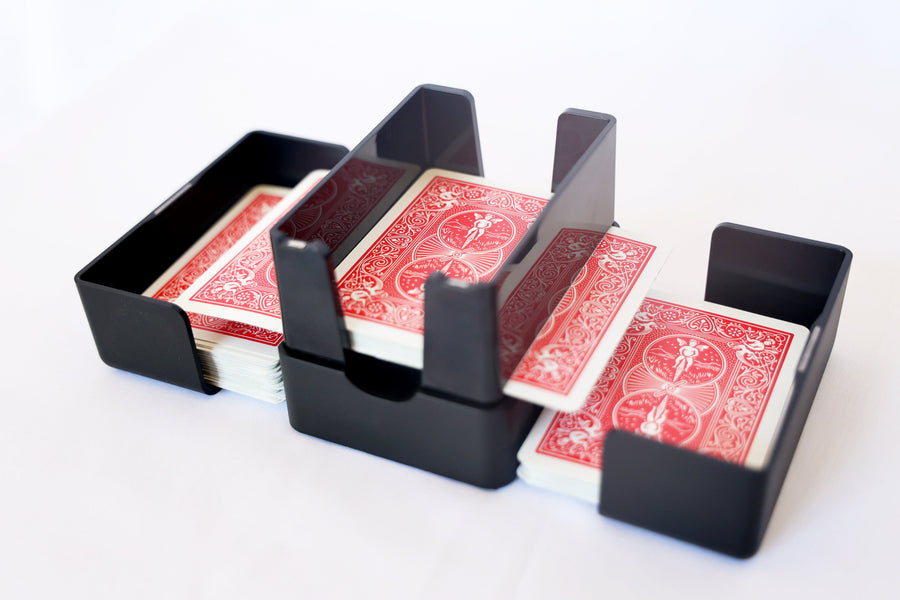
Product photo shows the original Lotus V1.
The one these guides keep pointing to
Lotus Card Shuffler V2
The Tabletop Family rated the Lotus V2 24/25, their Best Overall among the 8 distinct models they bench-tested from 13 shufflers. Lotus supplied its review units.
$89.00 Free US shipping
Order Now